Best Hard Drives for Your Synology NAS in 2026: WD Red Plus vs Seagate IronWolf vs WD Red Pro
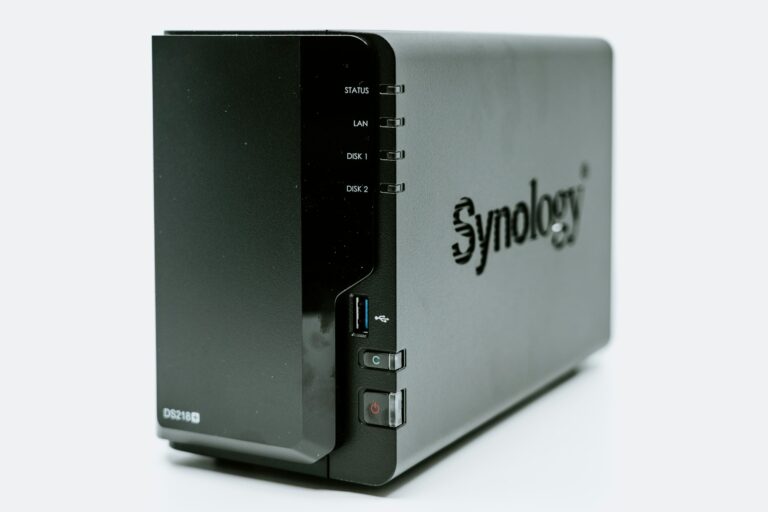
Buying a Synology NAS is the easy part. Picking the right hard drives to put inside it is where most beginners get tripped up. The wrong drives can run hot, fail early, or simply not show up on Synology’s compatibility list — meaning your NAS won’t recognize them at all.
This guide cuts through the noise. We’ve tested and researched the best hard drives Synology NAS 2026 buyers need — all verified on Synology’s official compatibility list.
Table of Contents
Why You Can’t Use Regular Desktop Drives in a NAS
Before we get to recommendations, this is worth understanding. Standard desktop drives like the WD Blue or Seagate Barracuda are designed to run for a few hours a day. A NAS runs 24 hours a day, 7 days a week. Desktop drives in a NAS environment run hotter, wear out faster, and aren’t covered under warranty for always-on use.
NAS-rated drives are specifically engineered for:
- Continuous 24/7 operation without overheating
- Vibration compensation — when two drives spin next to each other in a NAS enclosure, they create vibration that can cause read/write errors. NAS drives have firmware that compensates for this.
- Error recovery settings tuned for RAID arrays
- Compatibility with Synology’s DSM software and health monitoring
The price difference between a desktop drive and a NAS drive is usually $10-20. It’s worth every penny.
The Synology Compatibility List — Check This First
Before buying any drive, verify it’s on Synology’s official compatibility list at synology.com/compatibility. Search your NAS model (e.g. DS223j) and filter by hard drives. Drives on this list are guaranteed to work with your unit and are supported by Synology’s health monitoring tools.
Every drive recommended in this guide is on Synology’s compatibility list for current 2-bay models.
Our Top Picks for 2026
1. WD Red Plus — Best Overall for Home Users
Available in: 1TB, 2TB, 3TB, 4TB, 6TB, 8TB
Price (4TB): ~$75-85
The WD Red Plus is the drive we recommend to most home users setting up their first Synology NAS. It hits the sweet spot of price, performance, reliability, and compatibility.
What makes it stand out is CMR recording technology — more on why that matters below. It runs cool, operates quietly, and WD backs it with a 3-year warranty. For a home NAS running photos, documents, and media files, the 4TB model handles years of storage without issue.
Best for: First-time NAS buyers, photo and document storage, home media libraries up to 4-6TB
2. Seagate IronWolf — Best Runner-Up, Great for Larger Builds
Available in: 1TB through 16TB
Price (4TB): ~$80-90
The IronWolf is WD Red Plus’s closest competitor and a genuinely excellent drive. Seagate includes IronWolf Health Management — software that integrates with Synology’s DSM to proactively monitor drive health and warn you before a failure happens.
It runs slightly warmer than the WD Red Plus under sustained load but is whisper quiet and performs consistently over time. Seagate’s 3-year warranty matches WD’s.
If you’re building a larger NAS with 4+ bays or planning to store 8TB+ of data, IronWolf’s higher capacity options (up to 16TB) give you more headroom than the Red Plus line.
Best for: Larger builds, users who want proactive health monitoring integration, capacities above 8TB
3. WD Red Pro — Best for Power Users and Always-On Workloads
Available in: 2TB through 24TB
Price (4TB): ~$100-110
The Red Pro is the premium version of the Red Plus, rated for heavier workloads — specifically NAS systems with 8+ bays running in business environments. For a home 2-bay setup like the DS223j, it’s overkill. But if you’re running a home lab that’s always busy — multiple Plex streams, constant backups, a Home Assistant setup writing data continuously — the Red Pro’s higher workload rating gives you extra headroom.
It also comes with a 5-year warranty, which is two years longer than the Red Plus or IronWolf.
Best for: Power users, always-on home labs, future-proofing a larger build
What to Avoid: SMR Drives in a NAS
This is the most important thing to know that most buying guides skip. Hard drives use one of two recording technologies:
CMR (Conventional Magnetic Recording) — reliable, consistent, designed for NAS use. All three drives above use CMR.
SMR (Shingled Magnetic Recording) — cheaper to manufacture but significantly slower when writing large amounts of data. SMR drives in a RAID array can cause your NAS to become unresponsive during rebuilds and are not recommended for NAS use.
The drives to specifically avoid in a Synology NAS: WD Red (non-Plus, non-Pro) drives manufactured between 2020-2022 used SMR without clearly labeling it. Always verify CMR before buying — it’s listed in the product specifications.
How Much Storage Do You Actually Need?
Remember: in RAID 1 (mirroring), your usable storage equals one drive’s capacity. Two 4TB drives in RAID 1 gives you 4TB of usable space — the second drive is a mirror backup of the first.
Here’s a rough guide:
| Use Case | Recommended Size |
|---|---|
| Photos + documents for 1-2 people | 2-4TB |
| Photos + documents for a family | 4-6TB |
| Photos + media library (movies/TV) | 6-8TB |
| Large Plex library + photos | 8TB+ |
When in doubt, buy more than you think you need. Drives are cheaper per TB at higher capacities and upgrading later requires buying two new drives and rebuilding your RAID — more hassle than just buying bigger upfront.
Our Recommendation
For most people setting up a Synology DS223j or DS224+ for the first time:
Buy 2x WD Red Plus 4TB (WD40EFZZ)
It’s what we run personally and it works great — with one caveat worth knowing. The WD40EFZZ isn’t on Synology’s official compatibility list, which sounds alarming but in practice isn’t a dealbreaker for home users. The drive performs reliably in our DS223j, runs cool, and has given us zero issues. What “not on the list” really means is that Synology hasn’t officially tested and certified that specific model — not that it doesn’t work. That said, if you want zero ambiguity, the WD Red Plus 6TB (WD60EFPX) is on the compatibility list and is worth the small price bump for peace of mind.
Quick Comparison
| Drive | Price (4TB) | Warranty | Recording | Best For |
|---|---|---|---|---|
| WD Red Plus | ~$80 | 3 years | CMR | Home users, first NAS |
| Seagate IronWolf | ~$85 | 3 years | CMR | Larger builds, health monitoring |
| WD Red Pro | ~$105 | 5 years | CMR | Power users, heavy workloads |
Already have your drives picked out? Read our complete guide to setting up your Synology NAS and replacing iCloud for free.